


Few Apple accessories divide opinion quite like the Magic Mouse. Ask ten Mac users what they think about it and you’ll probably get ten different answers. Some people won’t use anything else because they love the smooth gestures and the way it works with macOS. Others replace it after only a few days because they never find it comfortable.
So who’s right?
As it turns out… they both are.
The Magic Mouse wasn’t designed to compete with every mouse on the market. Apple designed it to feel like an extension of macOS. That decision gives it some unique advantages, but it also comes with compromises that won’t suit everyone. Understanding those design trade-offs is the key to deciding whether the Magic Mouse belongs in your workflow.
If you’re new to Apple’s ecosystem, the Magic Mouse makes a lot more sense once you understand how Apple designs its hardware and software to work together. We’ve explained that philosophy in plain English in our Apple MacBooks Explained guide, which serves as the foundation for understanding many of Apple’s accessories.
In this review, we won’t simply tell you whether the Magic Mouse is good or bad. Instead, we’ll explain why some people love it, why others don’t, and most importantly, whether it’s the right mouse for the way you work.
Before We Judge the Magic Mouse, We Need to Understand One Thing
Most Magic Mouse reviews try to answer one question:
Is it a good mouse?
That sounds like the obvious question.
But it isn’t the most helpful one.
The better question is:
Why do so many people have completely different opinions about the Magic Mouse?
The answer isn’t as complicated as you might think.
It comes down to one simple idea that most reviews never explain.
The Question Almost Every Magic Mouse Review Never Asks:
What does the Magic Mouse have that other mice don’t?
Apple didn’t set out to build just another wireless mouse.
It wanted to create a mouse that feels like an extension of macOS.
To achieve that, Apple focused on:
- Smooth Multi-Touch gestures
- Natural, fluid scrolling
- A clean minimalist design
- Seamless integration with macOS
Those choices give the Magic Mouse an experience that many Mac users genuinely love.
But they also lead to another question.
What did Apple have to give up to achieve that?
Most of us compare products by looking at what they offer.
More features.
More buttons.
That’s how we’ve been taught to shop.
But that’s only half the story.
The question most people never ask is:
What did the designers have to sacrifice to create those features?
💥 Every design is a series of trade-offs. The important question isn’t what a product gains—it’s what it gives up to gain it.
No single design can satisfy everyone because people value different things.
Think about buying a car.
A sports car sacrifices comfort for speed.
An SUV sacrifices speed for space and comfort.
Neither vehicle is better.
They’re simply designed for different people with different priorities.
The Magic Mouse follows exactly the same principle.
Apple didn’t accidentally make the Magic Mouse flatter, replace the traditional scroll wheel with a touch surface, or make the entire top surface touch-sensitive.
Every one of those decisions was intentional.
Apple wanted the Magic Mouse to feel like an extension of macOS. Its smooth gestures, minimalist design and seamless scrolling all come from that single design philosophy.
The trade-off is that a flatter mouse doesn’t support your hand as much as a taller mouse that fills your palm. For some people, that’s perfectly comfortable. For others, it becomes uncomfortable during long work sessions.
Companies like Logitech have taken a different approach. The Logitech MX Master 4, for example, prioritizes ergonomics and long-session comfort over the Magic Mouse’s slim, minimalist design.
Instead of prioritizing gestures and a minimalist design, they focused on comfort, palm support and long hours of use.
Neither company is wrong.
They’re simply solving different problems.

💥 The best mouse isn’t the one with the most features. It’s the one that lets you focus on your work instead of your hand.
Once we understand the trade-offs each company made, the debate surrounding the Magic Mouse becomes much easier to understand.
💥 The Magic Mouse isn’t for everyone—and that’s okay. It was never designed to be.
Now we understand why the Magic Mouse divides opinion, let’s look at what it’s actually like to use every day.
👉 Check the latest price of the Apple Magic Mouse on Amazon.
What Is the Magic Mouse Actually Like to Use?
If you’ve never used the Magic Mouse before, the first thing you’ll probably notice isn’t the shape.
It’s the gestures.
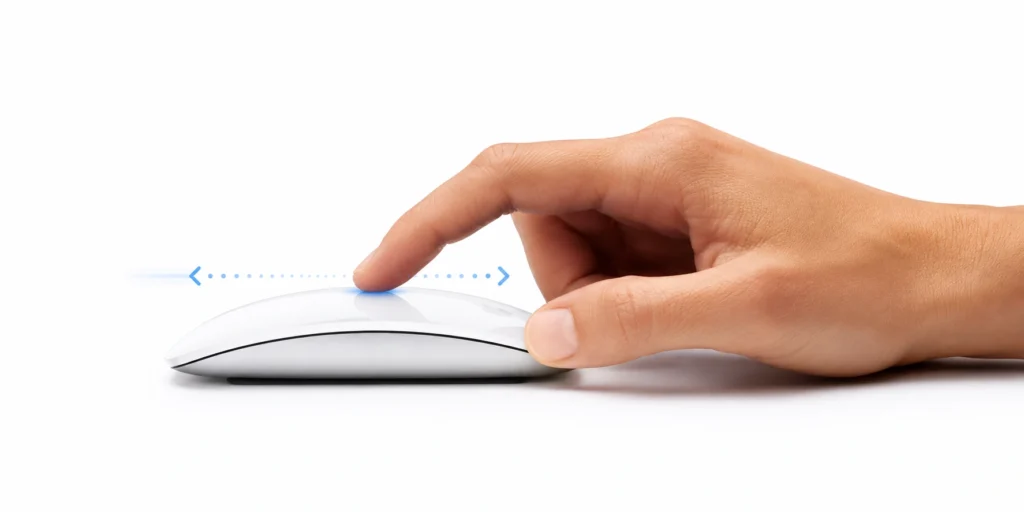
Scrolling through a webpage feels much closer to using your MacBook’s trackpad than using a traditional mouse. Instead of clicking a scroll wheel, you simply slide one finger across the top surface. The scrolling feels smooth, natural and almost effortless.
The same applies to gestures.
With a quick swipe, you can move between full-screen apps, switch desktops and navigate around macOS in a way that feels familiar if you’ve already been using a MacBook.
💥 The Magic Mouse isn’t really competing with every mouse on the market. It’s trying to bring part of the MacBook’s trackpad experience to people who prefer using a mouse.
The experience feels less like using a traditional mouse and more like extending the way you already interact with your MacBook.
Of course, those same design choices come with trade-offs.
The low profile makes the Magic Mouse easy to carry in a laptop bag and looks perfectly at home next to a MacBook. But because it sits lower than many traditional mice, it doesn’t fill your hand in the same way. Some people find it comfortable enough for everyday use, while others start noticing discomfort during long working sessions.
The Magic Mouse is available in both White Multi-Touch and Black Multi-Touch finishes, giving you a choice between two distinct looks.
The rechargeable battery is another good example.
It lasts long enough that most people won’t think about charging it very often. When it eventually does need charging, however, Apple’s decision to place the charging port underneath the mouse means you can’t use it while it’s plugged in. It doesn’t happen often, but when it does, the criticism is completely understandable.
Overall, Apple achieved exactly what it set out to build.
It delivers one of the smoothest gesture experiences available on macOS, wrapped in a clean, minimalist design that’s easy to carry wherever you work.
Whether it’s the right mouse for you depends on which trade-offs matter most.
Who Should Buy the Magic Mouse?
The Magic Mouse isn’t the right choice for everyone, but it’s an excellent choice for the right person.
Even though the MacBook’s trackpad is already one of the best available, the Magic Mouse is designed for people who still prefer using a mouse.
It isn’t trying to replace the trackpad experience. It’s trying to bring part of that experience to people who prefer using a mouse instead.
You’ll probably enjoy the Magic Mouse if you:
- Already use a MacBook and love the built-in trackpad gestures.
- Prefer a clean, minimalist workspace with as few accessories as possible.
- Travel regularly and want a mouse that’s slim and easy to carry.
- Spend more time browsing, studying, writing or doing general productivity work than performing long hours of precision-based tasks.
- Value smooth scrolling and gesture support more than extra buttons and a highly ergonomic shape.
If that sounds like you, Apple’s design priorities are probably very close to your own.
The Magic Mouse won’t feel like a compromise.
It will feel exactly like the mouse Apple intended it to be.
Who Should Consider Something Else?
The Magic Mouse isn’t the right tool for every workflow.
You may be happier with a different mouse if you:
- Spend long hours working at a desk every day.
- Want a mouse that fills your hand and provides more palm support.
- Frequently use programmable buttons for shortcuts or creative software.
- Prefer comfort over gestures.
- Already know that hand or wrist discomfort becomes a problem during long work sessions.
If that sounds more like you, Apple’s design priorities may not match your own.
That doesn’t mean the Magic Mouse is a bad product.
It simply means Apple chose to solve a different problem.
Companies like Logitech have spent decades designing mice with ergonomics and long-term comfort as their main priority.
If all-day comfort matters more to you than gestures and seamless macOS integration, Logitech currently builds better ergonomic mice than Apple.
If that sounds more like you, our Logitech MX Master 4 review will help you decide whether it’s a better fit for the way you work.
Not because it’s a “better” mouse.
Because for some people, it will simply be the better fit.
Charging and Battery Life
One of the biggest criticisms of the Magic Mouse has nothing to do with how it feels in your hand.
It’s how you charge it.
Unlike most rechargeable mice, the charging port is on the bottom. That means you can’t use the Magic Mouse while it’s plugged in.
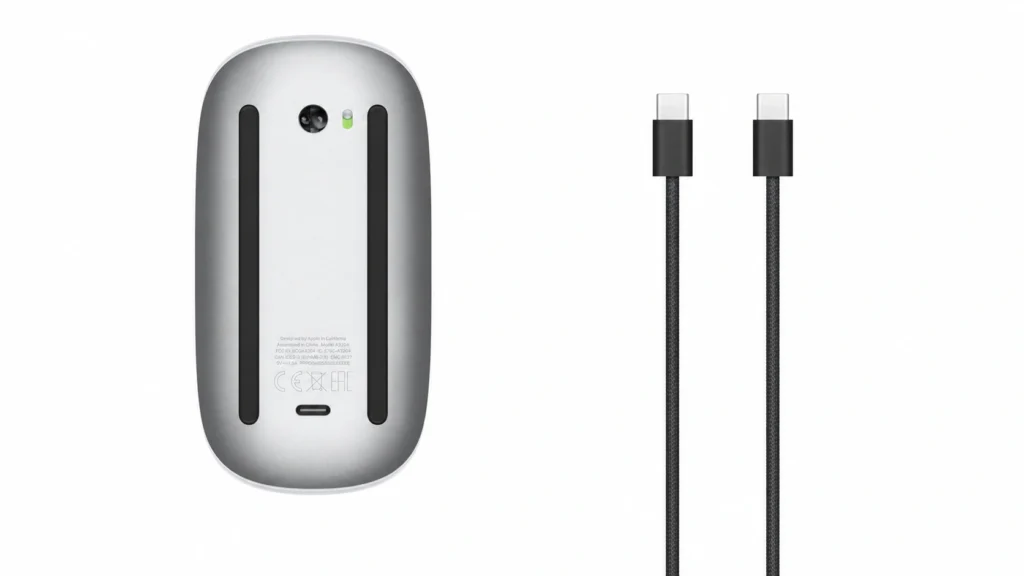
Fortunately, it isn’t something you’ll deal with very often. The rechargeable battery lasts long enough that most people won’t think about charging it until the battery is almost empty.
The problem is that when you do eventually need to charge it, Murphy’s Law has a habit of showing up. It always seems to happen when you’re in the middle of something important.
A few minutes of charging is usually enough to get you working again, but it’s still a design decision that feels unnecessarily inconvenient.
For most people, this won’t be a daily frustration.
But when it does happen, it’s difficult to ignore because it interrupts your workflow in a way that most rechargeable mice don’t.
The criticism is fair—and for good reason.
Magic Mouse Specifications at a Glance
If you’re looking for the key specifications, here’s a quick overview. We’ve already explained what these mean throughout the review, so think of this as a handy reference rather than the main reason to buy the Magic Mouse.
| 📋 Specification | 🖱️ Magic Mouse |
|---|---|
| ⚖️ Weight | 99 g (3.49 oz) |
| 📏 Dimensions |
Height: 2.16 cm (0.85 in) Width: 5.71 cm (2.25 in) Length: 11.35 cm (4.47 in) |
| 🔋 Battery | Rechargeable lithium-ion battery |
| ⚡ Battery Life | Up to one month between charges |
| 🔌 Charging | USB-C |
| ✨ Gestures | Multi-Touch surface |
| 💻 Compatibility | 🍎 Mac 📱 iPad 🥽 Apple Vision Pro |
👉 See the latest Apple Magic Mouse price and availability on Amazon.
Final Verdict
The Apple Magic Mouse isn’t a mouse that tries to be everything to everyone.
It was designed for a very specific type of Mac user: someone who loves Apple’s clean design, enjoys the smooth gesture experience of the MacBook’s trackpad, and simply prefers working with a mouse.
If that’s you, the Magic Mouse is one of the most seamless mouse experiences available for macOS.
If your priorities are different—especially if all-day comfort, ergonomics or programmable buttons matter more—there are better options available.
That doesn’t make the Magic Mouse a bad product.
It simply means Apple chose a different set of priorities.
💥 Every design is a series of trade-offs. The important question isn’t what a product gains—it’s what it gives up to gain it.
The Magic Mouse isn’t for everyone—and that’s okay.
It was never designed to be.
At BestDigitalNomadGear, we don’t review products to declare winners.
We review products to match the right tool to the right person.
If this review helped you understand whether the Magic Mouse fits the way you work, then it has done exactly what it was meant to do.
👉 View the latest Apple Magic Mouse deals on Amazon.
Frequently Asked Questions

Is the Apple Magic Mouse ergonomic?
No—not in the traditional sense. Apple prioritized a low-profile design and Multi-Touch gestures over palm support. Whether it’s comfortable depends on how you use it and how long you typically work each day.
Is the Apple Magic Mouse worth it?
Yes, if you value macOS gestures, a minimalist design and seamless integration with Apple’s ecosystem. If long-term comfort is your highest priority, a more ergonomic mouse like the Logitech MX Master 4 may be a better fit.
Does the Apple Magic Mouse work with Windows?
Yes. The Magic Mouse connects to Windows using Bluetooth, but many of its Multi-Touch gestures and macOS-specific features aren’t fully supported.
Can you use the Apple Magic Mouse with an iPad?
Yes. The Magic Mouse works with compatible iPads running recent versions of iPadOS, allowing you to use pointer support and supported Multi-Touch gestures.
Does the Apple Magic Mouse use Bluetooth?
Yes. The Magic Mouse connects wirelessly using Bluetooth, making it easy to pair with compatible Macs, iPads and other supported devices.
Does the Apple Magic Mouse have a scroll wheel?
No. Instead of a traditional scroll wheel, the Magic Mouse uses a Multi-Touch surface that lets you scroll and perform gestures by sliding your finger across the top of the mouse.