ASUS ROG Strix G16 Review (2026): Intel vs AMD Gets Surprisingly Interesting

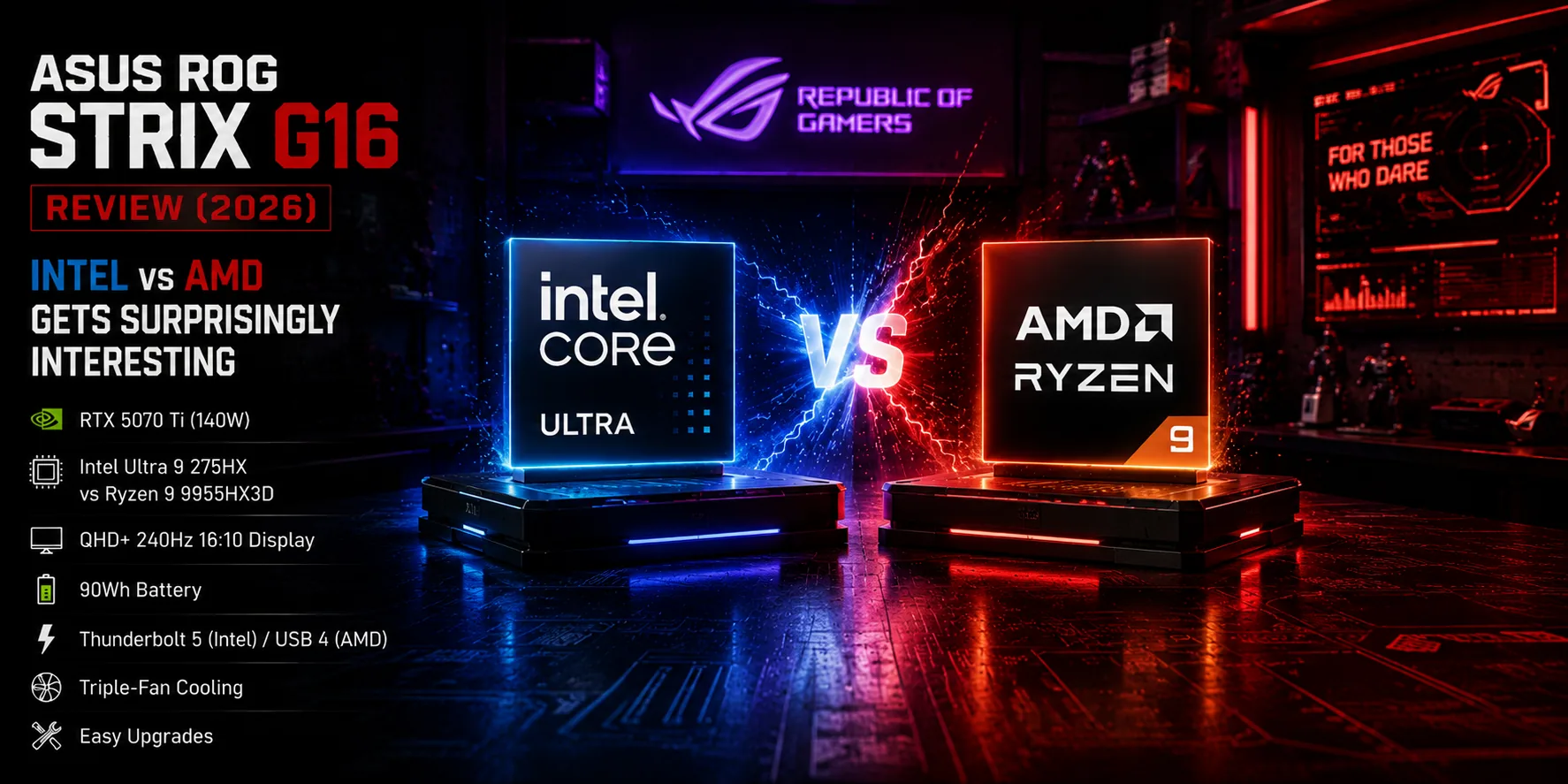
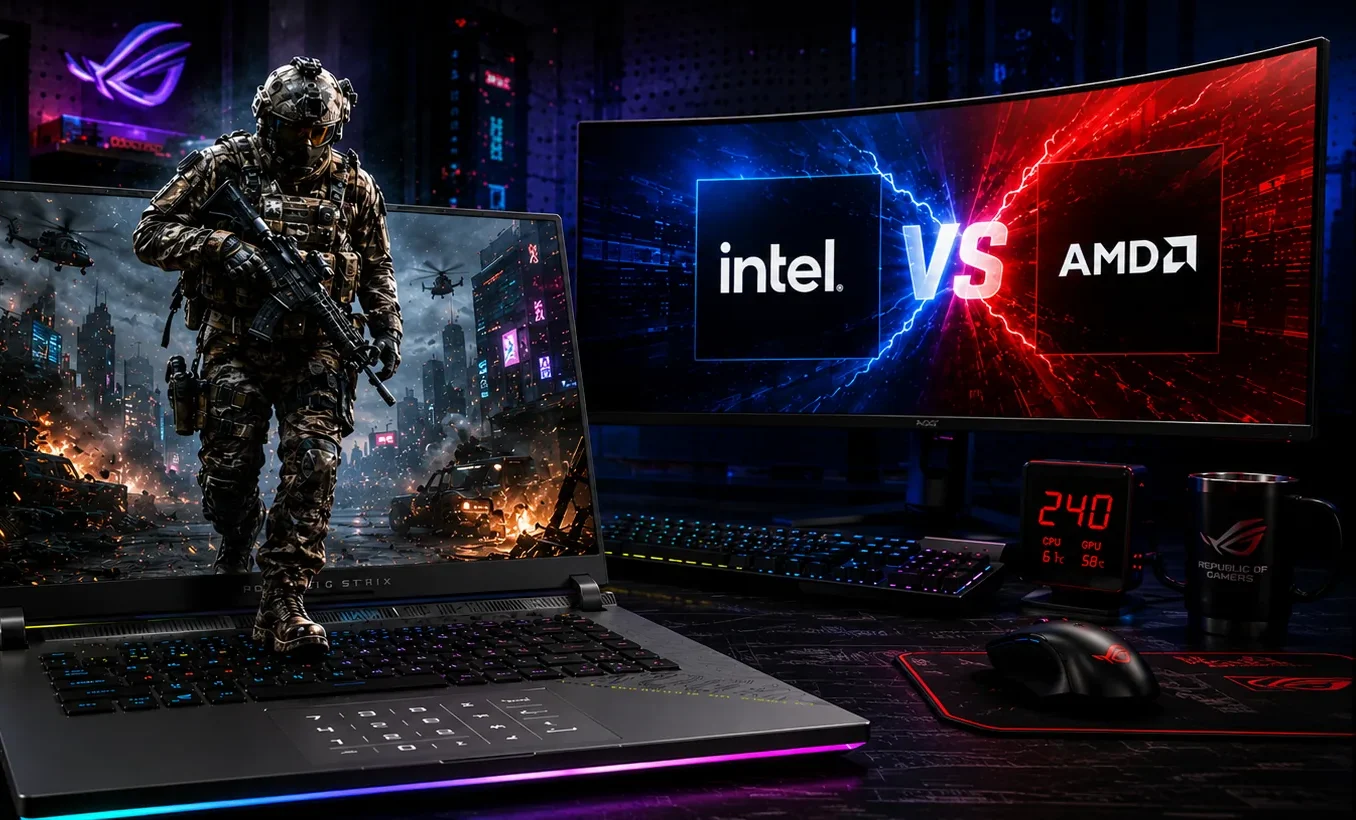
ASUS ROG Strix G16 gaming laptop review hero image showing Intel vs AMD comparison with RTX 5070 Ti performance setup

Disclosure: As an Amazon Associate, Best Digital Nomad Gear earns from qualifying purchases. This does not affect our reviews or recommendations. We only recommend products we believe provide genuine value to our readers.

The ASUS ROG Strix G16 is one of the most performance-focused gaming laptops currently available, but what makes this generation especially interesting is how close the Intel and AMD versions actually are.

On paper, many gamers would probably expect the AMD Ryzen 9 9955HX3D model to completely dominate gaming performance. But after extensive testing, the real story turned out to be far more complicated than that.

The Intel Core Ultra 9 275HX version stayed surprisingly competitive in gaming while also delivering:

  • significantly better battery life,

  • lower sustained temperatures,

  • Thunderbolt 5 support,

  • easier upgrade access,

  • and a more refined overall experience.

Meanwhile, the AMD model still pushes extremely strong gaming and creator performance, especially in workloads like Photoshop and browser-heavy tasks.

This creates a very interesting buying decision because the ASUS ROG Strix G16 is no longer simply about choosing “the fastest gaming laptop.”

Instead, it becomes about choosing what kind of high-performance gaming laptop experience you actually want.

That is what makes the Strix G16 one of the most popular gaming laptops on the market right now.

ASUS ROG Strix G16 Specifications

⚙️ ASUS ROG Strix G16 (Intel Model Tested) Specifications

⚙️ ASUS ROG Strix G16 (AMD Model Tested) Specifications

Specification ROG Strix G16 (Intel)
CPU Intel Core Ultra 9 275HX
GPU NVIDIA GeForce RTX 5070 Ti Laptop GPU
GPU Power Limit Up to 140W
Display 16-inch QHD+ (2560 × 1600)
Refresh Rate 240Hz
Aspect Ratio 16:10
Response Time 3ms
Memory Upgradeable DDR5 Memory
Storage NVMe SSD with Dual SSD Slots
Battery 90Wh
Ports Thunderbolt 5, HDMI 2.1, RJ45 Ethernet, USB-A, Combo Audio Jack
Biometrics Windows Hello Facial Recognition
Cooling Triple-Fan Cooling System
Best For Gaming, Esports, Streaming, Content Creation, and High-Performance Multitasking

The ASUS ROG Strix G16 Prioritizes Performance Over Portability

The first thing that becomes obvious about the ASUS ROG Strix G16 is that ASUS prioritized performance before portability.

This is not a thin-and-light gaming laptop trying to compete with machines like the ASUS ROG Zephyrus G16. The Strix G16 is thicker, heavier, more aggressive-looking, and clearly designed around sustained gaming performance.

That decision affects almost every part of the laptop:

  • larger cooling system,

  • higher GPU wattage,

  • more airflow,

  • larger vents,

  • and better sustained thermals.

The RTX 5070 Ti inside these models can run at up to 140W, which is extremely important because GPU wattage directly affects gaming performance.

Many thinner gaming laptops use lower power limits even when using the exact same GPU name.

That means:

  • two laptops may both advertise “RTX 5070 Ti,”

  • but the higher-wattage system can perform noticeably better during actual gaming.

The Strix G16 gives the GPU enough thermal and power headroom to maintain stronger sustained performance over longer sessions.

This becomes especially noticeable in demanding modern games running at QHD+ resolution.

The laptop itself is also fairly heavy:

  • AMD model: approximately 5.51 pounds

  • Intel model: approximately 5.84 pounds

And once the large 280W power brick is added, this becomes a serious backpack machine.

But honestly, that tradeoff makes sense for the type of laptop this is trying to be.

The Strix G16 is not designed for maximum portability.

It is designed to behave like a desktop gaming PC that happens to fold shut.

Intel vs AMD on the ASUS ROG Strix G16

ASUS ROG Strix G16 Intel vs AMD gaming performance comparison image with neon cyberpunk style

This is easily the most important part of the ASUS ROG Strix G16 discussion because these two models behave very differently once you start looking beyond raw benchmark numbers.

On paper, many gamers would probably assume the AMD Ryzen 9 9955HX3D model automatically destroys the Intel Core Ultra 9 275HX version.

But in real-world testing, the gap was much smaller than expected.

In some games:

  • AMD performed slightly better.

In others:

  • Intel stayed surprisingly close.

And once thermals, battery life, efficiency, usability, and upgradeability entered the conversation, the Intel model became significantly more compelling overall.

Intel finally feels genuinely competitive again in a high-performance gaming laptop like this.

A few years ago, AMD would likely have dominated this comparison more clearly.

This time, things are very different.

Intel vs AMD Performance on the ASUS ROG Strix G16

The Intel Core Ultra 9 275HX uses a hybrid architecture with:

  • Performance cores (P-cores)

  • Efficiency cores (E-cores)

That matters a lot more than many buyers realize.

The performance cores handle:

  • gaming,

  • heavy workloads,

  • rendering,

  • compiling,

  • and demanding tasks.

Meanwhile, the efficiency cores handle:

  • background processes,

  • lighter multitasking,

  • idle behavior,

  • browser tabs,

  • updates,

  • and lower-power workloads.

This is one of the main reasons the Intel model delivered dramatically better battery life during testing.

The AMD Ryzen 9 9955HX3D does not use the same efficiency-core approach.

Instead, AMD focuses more aggressively on raw high-performance behavior.

That helps AMD perform extremely well in certain workloads, especially gaming-focused and burst-heavy tasks.

For example:

  • Photoshop performance favored AMD.

  • Browser-based Speedometer testing also strongly favored AMD.

But the tradeoff is power consumption and thermals.

The AMD model regularly pushed closer to:

  • 90°C under sustained load.

Meanwhile, the Intel version generally hovered around:

  • 85–86°C.

That difference may not sound massive initially, but it directly affected sustained clock stability and overall efficiency.

The Intel system stayed extremely consistent during longer workloads.

ASUS ROG Strix G16 Gaming Performance

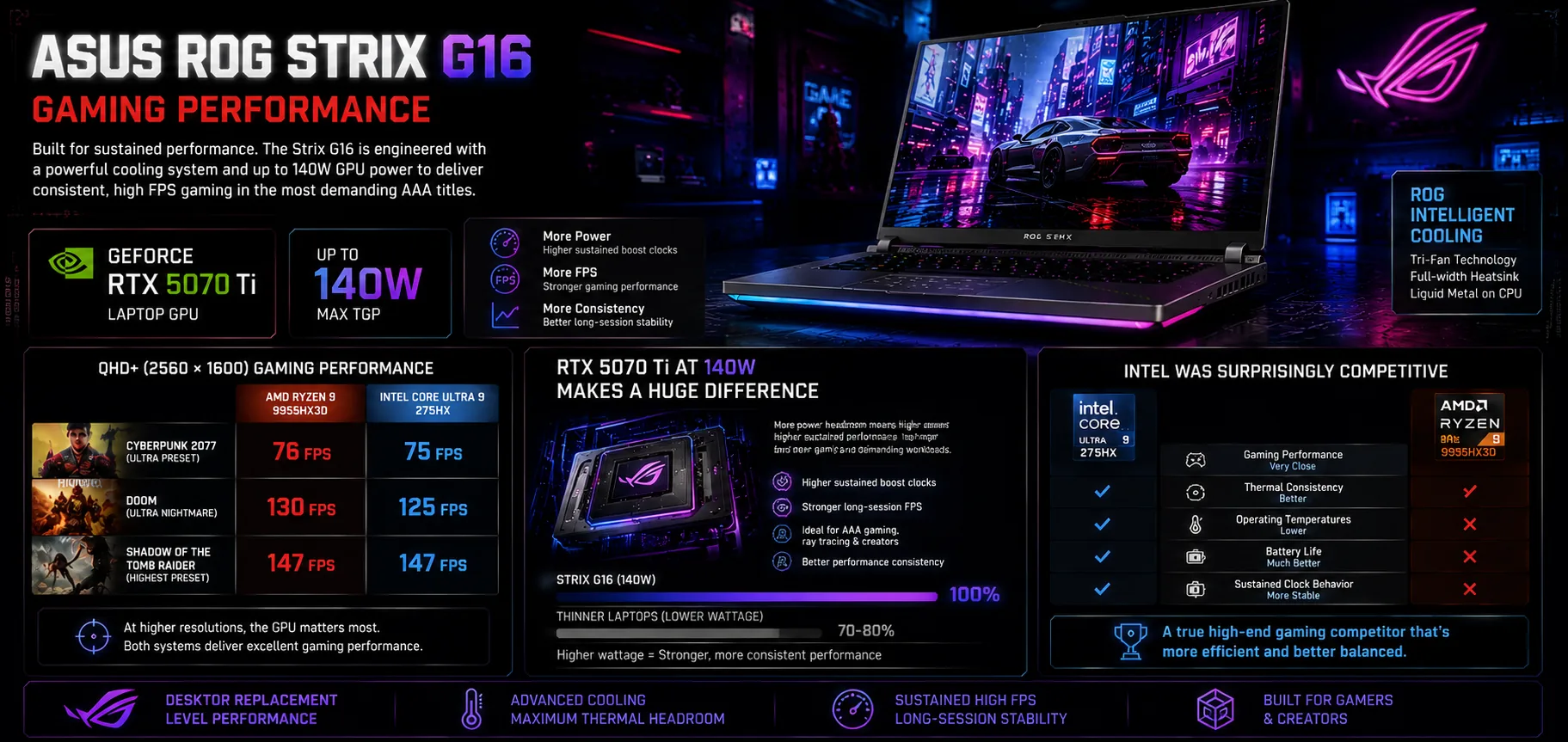
ASUS ROG Strix G16 ultrawide gaming performance infographic with RTX 5070 Ti and Intel vs AMD gaming benchmarks

The ASUS ROG Strix G16 performs exactly like a high-powered gaming laptop should.

This machine is clearly designed around sustained gaming performance instead of short benchmark bursts, and that becomes very obvious once modern AAA games start pushing both the CPU and GPU heavily.

The tested configurations included an RTX 5070 Ti Laptop GPU running at up to 140W.

That wattage is extremely important.

A lot of thinner gaming laptops use lower GPU power limits to reduce heat and improve portability, but lower wattage also reduces gaming performance.

The Strix G16 gives the GPU enough thermal and power headroom to fully stretch its legs.

That directly impacts:

  • frame rates,

  • stability,

  • and long-session gaming consistency.

This is one of the biggest reasons the Strix G16 feels much closer to a desktop replacement than many thinner gaming laptops currently on the market.

QHD+ Gaming Performance Was Surprisingly Close Between Intel and AMD

One of the most surprising findings from testing was how close the Intel and AMD models actually were during gaming.

At QHD+ resolution (2560 × 1600), the gaming gap between the two systems was often very small.

Examples included:

Cyberpunk 2077:

  • AMD: 76 FPS

  • Intel: 75 FPS

DOOM:

  • AMD: 130 FPS

  • Intel: 125 FPS

Shadow of the Tomb Raider:

  • Both systems: 147 FPS

This tells us something very important:

At higher resolutions, the GPU matters far more than many gamers expect.

The RTX 5070 Ti is doing most of the heavy lifting here, meaning CPU differences become less dramatic once GPU load increases.

That does NOT mean the CPUs are unimportant.

But it does mean many buyers may overestimate how much gaming advantage the AMD chip actually delivers in real-world gameplay.

In practice, both systems perform extremely well.

RTX 5070 Ti at 140W Makes a Huge Difference

The RTX 5070 Ti inside the Strix G16 benefits massively from ASUS allowing it to run at up to 140W.

For comparison, thinner systems like the ASUS ROG Zephyrus G16 often run lower GPU wattages to manage heat and battery life.

Even when using the same GPU name, lower wattage usually means:

  • lower sustained boost clocks,

  • lower FPS,

  • and weaker long-session performance.

The Strix G16 avoids that problem.

Because the cooling system is larger and more aggressive, ASUS can allow the GPU to sustain much higher performance for longer periods.

That extra power headroom showed up repeatedly during testing.

Games simply maintained stronger performance consistency over time.

This is especially important for:

  • competitive gaming,

  • long AAA gaming sessions,

  • ray tracing workloads,

  • and GPU-heavy creator applications like Blender.

Intel Was Surprisingly Competitive in Gaming

A few years ago, most enthusiasts would probably assume AMD completely dominates Intel in gaming laptops.

But this generation feels very different.

The Intel Core Ultra 9 275HX stayed remarkably competitive throughout testing.

Not only did Intel stay close in gaming performance, but it also delivered:

  • better thermal consistency,

  • lower operating temperatures,

  • much better battery life,

  • and more stable sustained clock behavior.

The Intel system also maintained flatter average core clock behavior under heavy load, which showed that the cooling system and power management were working extremely well together.

That balance is what makes the Intel model so interesting this year.

Instead of feeling like:

  • “the productivity option,”

it actually feels like:

  • a legitimate high-end gaming competitor that also happens to be more efficient.

Thermals and Cooling Performance

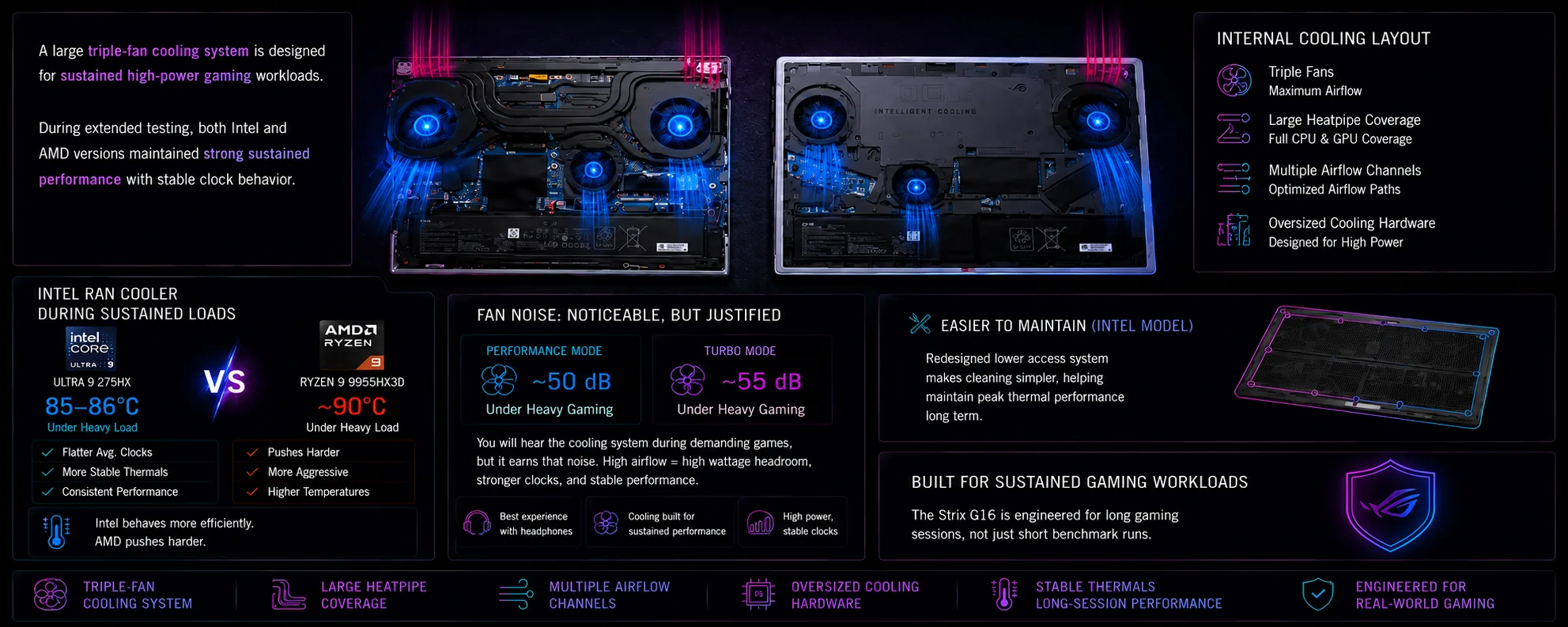
ASUS ROG Strix G16 thermals and cooling performance infographic with triple-fan cooling system

Cooling is one of the biggest reasons the ASUS ROG Strix G16 performs so well.

This laptop uses a large triple-fan cooling system designed specifically for sustained high-power gaming workloads, and honestly, ASUS did a very good job here.

A lot of gaming laptops benchmark well for a few minutes before temperatures rise and performance starts dropping.

The Strix G16 behaves differently.

During extended testing, both the Intel and AMD versions maintained very strong sustained performance with surprisingly stable clock behavior.

That consistency matters a lot in real-world gaming because modern AAA titles often keep laptops under heavy load for hours at a time.

Intel Ran Cooler During Sustained Loads

One of the more interesting results from testing was the thermal difference between the Intel and AMD models.

The Intel Core Ultra 9 275HX version generally hovered around:

  • 85–86°C under heavy load.

Meanwhile, the AMD Ryzen 9 9955HX3D model regularly pushed closer to:

  • 90°C.

That may not sound dramatic initially, but it directly affected sustained behavior.

The Intel model maintained:

  • flatter average clock speeds,

  • more stable thermal behavior,

  • and more consistent long-session performance.

The AMD version still performed extremely well, but it behaved more aggressively overall.

This matches the personality difference between these two systems:

  • AMD pushes harder,

  • Intel behaves more efficiently.

That theme appeared throughout almost every test.

Fan Noise Is Noticeable — But the Cooling Actually Justifies It

This is not a silent gaming laptop.

Under heavy gaming loads:

  • Performance mode produced roughly 50 dB of fan noise.

  • Turbo mode pushed closer to 55 dB.

You will absolutely hear the cooling system working during demanding games.

But the important thing is this:

The cooling system actually earns that noise.

Some gaming laptops become loud while still thermal throttling heavily.

The Strix G16 uses that airflow to maintain genuinely high sustained performance.

That makes the fan noise much easier to justify because you can clearly see where the thermal headroom is going:

  • higher GPU wattage,

  • stronger sustained clocks,

  • and stable gaming performance.

For competitive gamers using headphones, this will realistically not be a major issue.

But users looking for:

  • quiet operation,

  • thin-and-light portability,

  • or silent creator-laptop acoustics,

should probably look at something like the Zephyrus lineup instead.

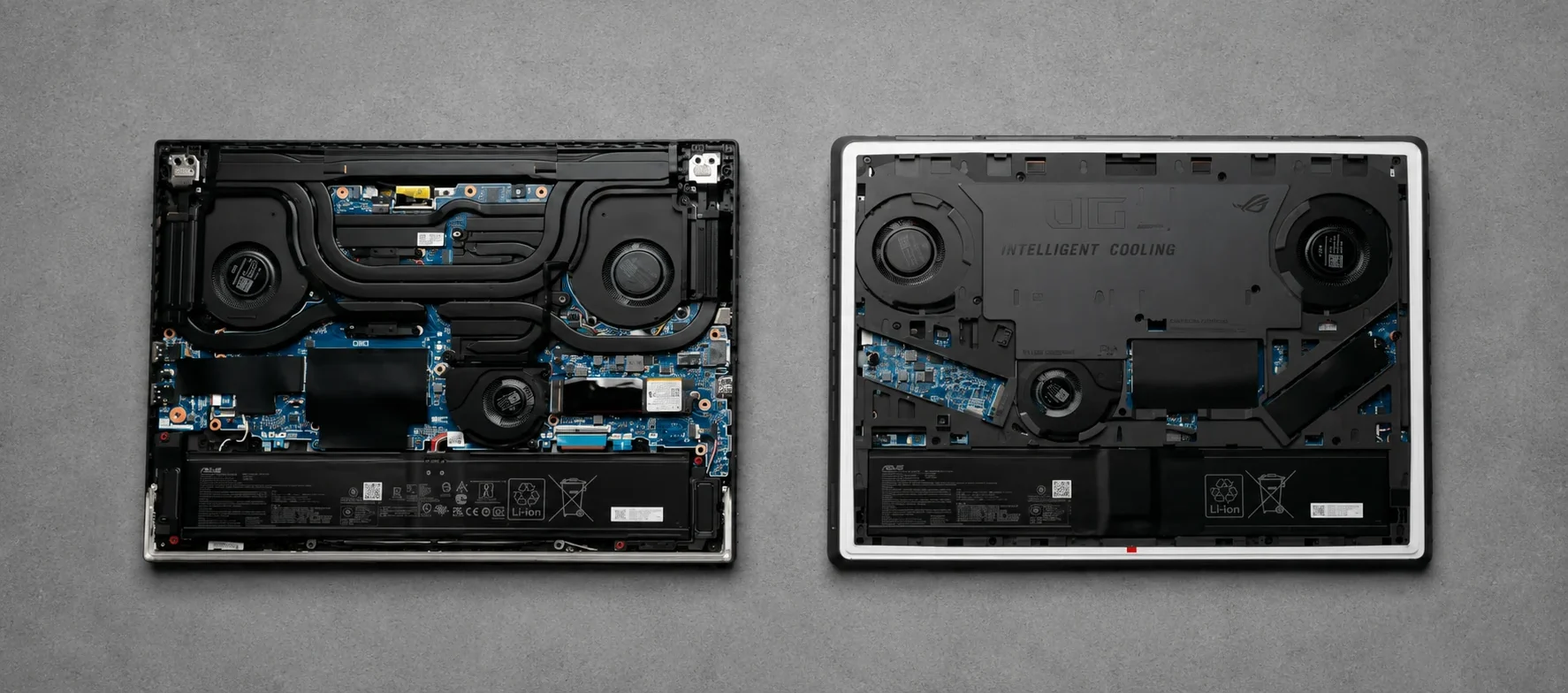
The Internal Cooling Layout Explains Why the Laptop Performs So Well

The internal teardown images reveal just how aggressively ASUS designed the cooling system inside the Strix G16.

Both models include:

  • triple fans,

  • large heatpipe coverage,

  • multiple airflow channels,

  • and oversized cooling hardware.

The Intel version also appears slightly easier to maintain overall because ASUS redesigned the lower access system.

This becomes important long term because gaming laptops naturally accumulate:

  • dust,

  • thermal buildup,

  • and fan debris over time.

The easier a laptop is to maintain, the better its long-term thermal performance usually remains.

The Strix G16 clearly feels engineered around sustained gaming workloads rather than just marketing numbers.

ASUS ROG Strix G16 Battery Life

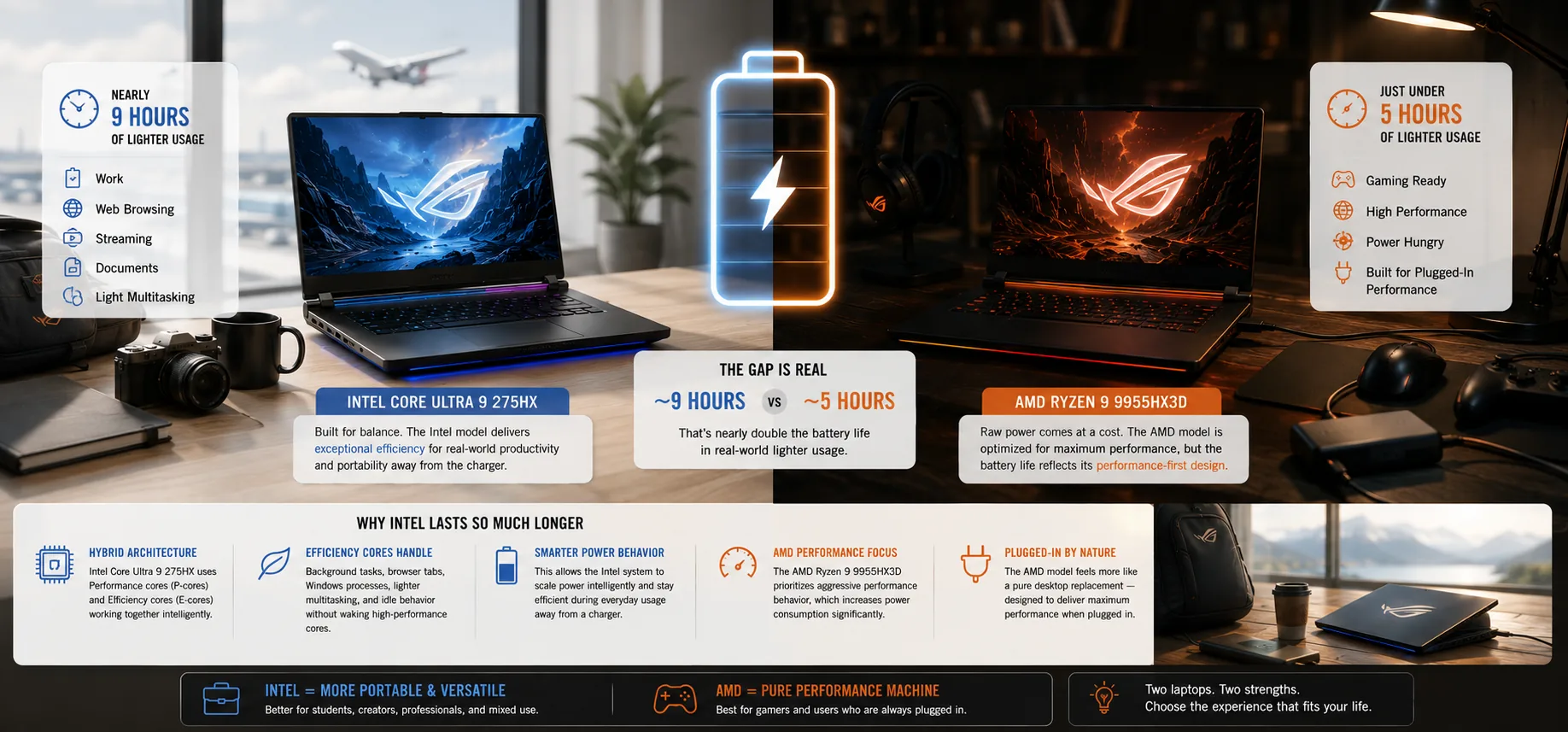
ASUS ROG Strix G16 Intel vs AMD battery life comparison in a bright ultrawide editorial gaming setup

Battery life ended up being one of the biggest differences between the Intel and AMD versions of the ASUS ROG Strix G16.

The gap was much larger than expected.

The Intel Core Ultra 9 275HX model delivered:

  • nearly 9 hours of lighter usage.

Meanwhile, the AMD Ryzen 9 9955HX3D version landed at:

  • just under 5 hours.

That is not a small difference.

That completely changes how portable these two laptops actually feel in real-world usage.

Why Intel Lasted So Much Longer

The biggest reason for the battery life difference comes down to CPU architecture.

The Intel Core Ultra 9 275HX uses:

  • Performance cores (P-cores)

  • Efficiency cores (E-cores)

The efficiency cores handle:

  • background activity,

  • browser tabs,

  • Windows processes,

  • lighter multitasking,

  • and idle behavior

without constantly waking up the larger high-performance cores.

That allows the Intel system to behave noticeably efficiently during normal everyday usage.

The AMD Ryzen 9 9955HX3D does not use the same efficiency-core approach.

Instead, AMD pushes more aggressively toward raw performance behavior, which helps in certain workloads but also increases power consumption significantly.

That difference became extremely obvious during unplugged testing.

The Intel model simply felt far more flexible away from a charger.

The AMD Model Feels Like a Permanently Plugged-In Gaming Machine

The AMD version still performs extremely well, but the weaker battery life changes the ownership experience quite a bit.

Realistically, the AMD model behaves more like:

  • a pure desktop replacement,

  • or a permanently plugged-in gaming machine.

Meanwhile, the Intel version feels far more realistic for:

  • students,

  • programmers,

  • creators,

  • office work,

  • and mixed gaming/productivity usage.

That does not suddenly make the Intel version an ultrabook.

This is still a large high-performance gaming laptop with a powerful RTX GPU.

But compared to the AMD configuration, the Intel model feels dramatically more balanced overall.

ASUS ROG Strix G16 Display Review

ASUS ROG Strix G16 display showcase with vibrant Mediterranean coastal wallpaper and bright daylight scenery

Both the Intel and AMD versions of the ASUS ROG Strix G16 use a:

  • 16-inch QHD+ display

  • 2560 × 1600 resolution

  • 240Hz refresh rate

  • 16:10 aspect ratio

  • 3ms response time

The gaming experience on this panel feels excellent.

No, this is not the OLED display found on laptops like the ASUS ROG Zephyrus G16.

But the IPS-level panel here still performs extremely well for gaming.

The 240Hz Refresh Rate Makes Competitive Games Feel Extremely Smooth

The 240Hz refresh rate plays a major role in the overall gaming experience.

Fast-paced games feel:

  • smooth,

  • responsive,

  • and very fluid during movement.

This becomes especially noticeable in:

  • competitive shooters,

  • esports titles,

  • and fast-action games.

The 3ms response time also helps reduce motion blur and ghosting during rapid movement.

Combined with the strong GPU performance from the RTX 5070 Ti, the Strix G16 delivers a genuinely premium gaming experience at high refresh rates.

The 16:10 Aspect Ratio Is Better for Productivity Too

One of the underrated strengths of modern gaming laptops is the shift toward taller 16:10 displays.

Compared to older 16:9 gaming laptops, the extra vertical space makes:

  • web browsing,

  • multitasking,

  • coding,

  • content creation,

  • and productivity work

feel noticeably more comfortable.

This matters because the Strix G16 is powerful enough to realistically function as:

  • a gaming machine,

  • a creator laptop,

  • and a workstation replacement.

The taller display helps reinforce that versatility.

Keyboard, Touchpad, and Everyday Usability

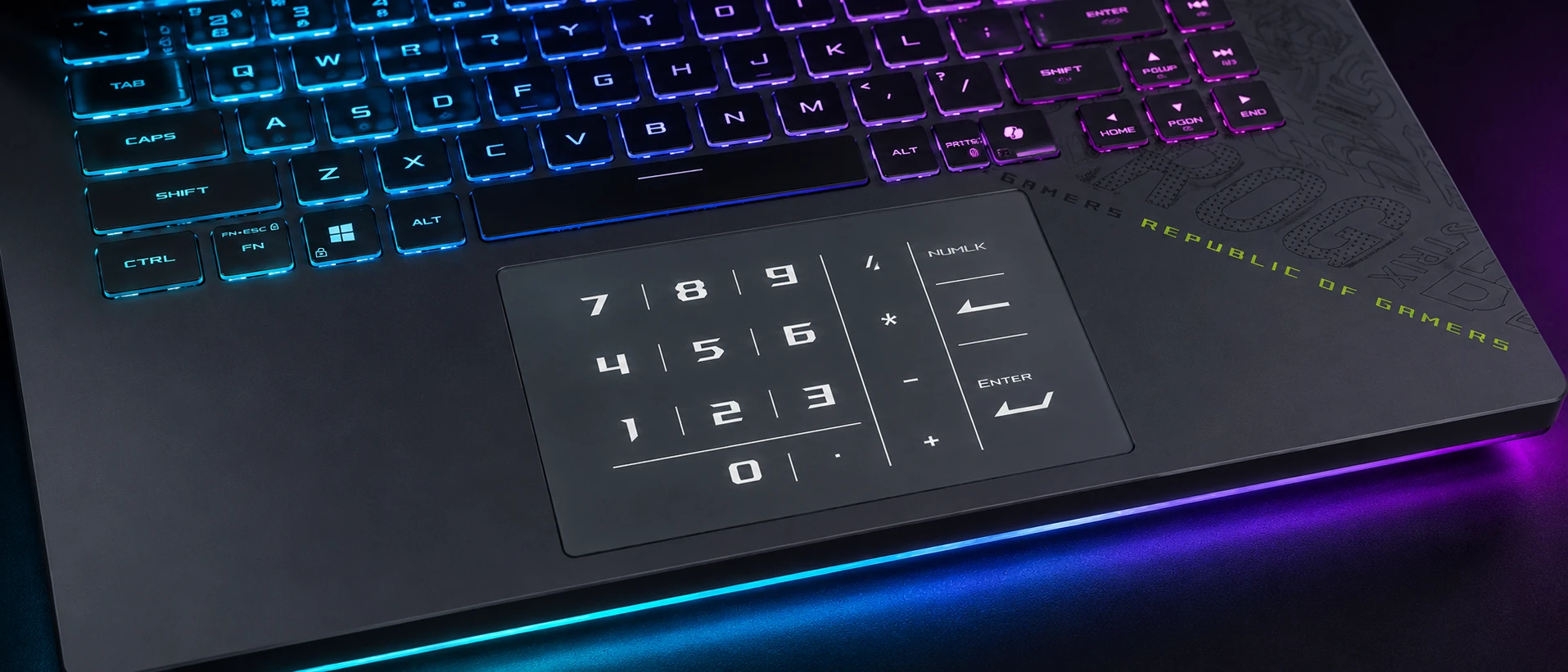
Close-up ultrawide view of the ASUS ROG Strix G16 keyboard and illuminated glass NumberPad touchpad

Gaming laptops often focus so heavily on performance that the everyday usability experience becomes an afterthought.

Thankfully, that is not really the case with the ASUS ROG Strix G16.

The keyboard experience on both models is genuinely good, especially for a gaming laptop.

ASUS includes:

  • 2mm key travel,

  • solid tactile feedback,

  • dedicated macro keys,

  • media controls,

  • and a full-size gaming-oriented layout.

The keyboard deck itself has a little softness under pressure, but it never feels overly weak or unstable during actual typing or gaming sessions.

For long gaming sessions, the keyboard feels comfortable and responsive.

The Intel Model Has a Much Better Touchpad

One of the surprising differences between the Intel and AMD models is the touchpad size.

The Intel version includes a significantly larger glass touchpad, and it feels noticeably more premium during daily use.

Both touchpads support ASUS’s virtual NumberPad functionality, allowing the touchpad to function as a numpad when needed.

That feature is genuinely useful for:

  • spreadsheets,

  • productivity work,

  • and quick number input.

But the Intel model simply feels more modern overall because of the larger touchpad area.

This is another example of the Intel version feeling slightly more refined and polished as a complete package.

Biometrics Are Another Major Difference

The Intel model also includes Windows Hello facial recognition through an IR camera setup.

The AMD version does not include:

  • facial recognition,

  • or a fingerprint scanner.

That means AMD owners will mostly rely on:

  • passwords,

  • or PIN login methods.

This may sound like a small detail, but features like Windows Hello genuinely improve the day-to-day experience of using a laptop.

Again, these little usability advantages continue adding up in favor of the Intel version.

ASUS ROG Strix G16 Ports and Connectivity

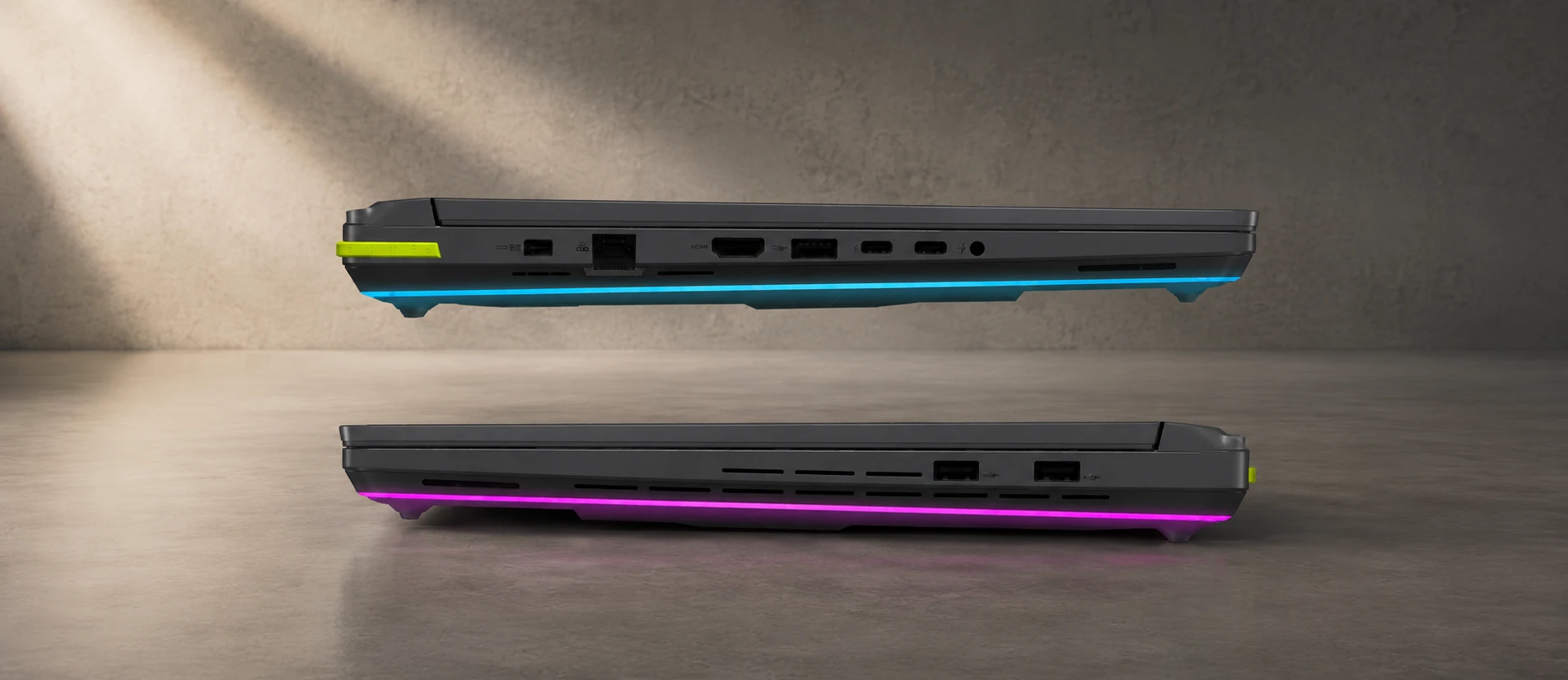
ASUS ROG Strix G16 side profile ports and connectivity comparison showing USB, HDMI, Ethernet and cooling vent layouts

The ASUS ROG Strix G16 includes a strong port selection overall, but the Intel model clearly has the better connectivity setup.

Both versions include:

  • HDMI 2.1

  • RJ45 Ethernet

  • USB-A ports

  • Combo audio jack

But there are some major differences once you look closer.

Thunderbolt 5 Is a Big Advantage for the Intel Model

The Intel version includes:

  • dual Thunderbolt 5 ports.

Meanwhile, the AMD version uses:

  • USB 4 instead.

Thunderbolt 5 provides major advantages for:

  • docking stations,

  • ultra-fast external storage,

  • multiple high-resolution displays,

  • creator workflows,

  • and future expandability.

The Intel model also includes:

  • an extra USB-A port,

  • and a newer proprietary charging connector.

Meanwhile, the AMD version still uses:

  • the older barrel-style charging connector.

For many gamers, these differences may not matter much initially.

But long term, the Intel model definitely feels more modern from a connectivity standpoint.

Port Placement Is Different Between the Two Models

Another interesting detail is the actual port positioning.

On the AMD version:

  • several ports are positioned closer toward the front of the laptop.

Meanwhile, the Intel version pushes more connectivity toward the rear area of the chassis.

That may sound minor, but gamers using:

  • wired mice,

  • external monitors,

  • Ethernet,

  • or multiple accessories

will often prefer rear-positioned ports because cable management becomes much cleaner.

It is another small example of the Intel model feeling slightly more refined overall.

Upgradeability and Internal Access

AMD
Intel
Asus Rog Strix G16 Upgradeability Internal Access E1780065736355

One of the most underrated strengths of the ASUS ROG Strix G16 is that ASUS still allows proper hardware access and upgradeability.

That matters a lot in a high-performance gaming laptop because modern games are huge, hardware requirements continue increasing, and many enthusiasts plan to keep their machines for several years.

The Strix G16 allows users to upgrade:

  • storage,

  • RAM,

  • and potentially the Wi-Fi card.

This immediately makes the laptop more appealing for long-term ownership compared to thinner systems with more restrictive designs.

The Intel Model Is Dramatically Easier to Open

This was actually one of the most interesting usability differences between the Intel and AMD versions.

The Intel model includes a redesigned lower access mechanism that allows users to access the internals quickly.

Instead of removing a large number of screws, ASUS implemented a system where users can:

  • slide the mechanism,

  • release the panel,

  • and quickly access the internals.

The AMD version is completely different.

To open the AMD model, users need to remove:

  • 11 screws

before finally accessing the internal components.

For casual buyers, this may not sound important initially.

But enthusiasts absolutely care about this because gaming laptops often need:

  • SSD upgrades,

  • fan cleaning,

  • thermal maintenance,

  • RAM upgrades,

  • or dust removal over time.

The easier a gaming laptop is to maintain, the better the ownership experience usually becomes years later.

Dual SSD Slots Are Extremely Important for Modern Gaming

Both versions of the Strix G16 include:

  • dual NVMe SSD slots.

That is a huge advantage.

Modern AAA games regularly exceed:

  • 100GB,

  • and sometimes approach 200GB installations with updates and texture packs.

A single SSD fills up very quickly once:

  • multiple large games,

  • editing software,

  • recordings,

  • mods,

  • and creator files

start accumulating.

The second SSD slot gives users a very easy path for future storage expansion without replacing the original drive.

That flexibility is something many enthusiasts specifically look for in gaming laptops.

SSD Speeds Were Surprisingly Good

During testing, the AMD model actually produced slightly faster SSD read and write speeds compared to the Intel version.

The difference was not massive, but it was noticeable during benchmarking.

In real-world usage, both systems still felt extremely fast for:

  • gaming,

  • application loading,

  • Windows responsiveness,

  • and large file transfers.

But it was an interesting result because most of the overall advantages leaned toward the Intel model elsewhere in testing.

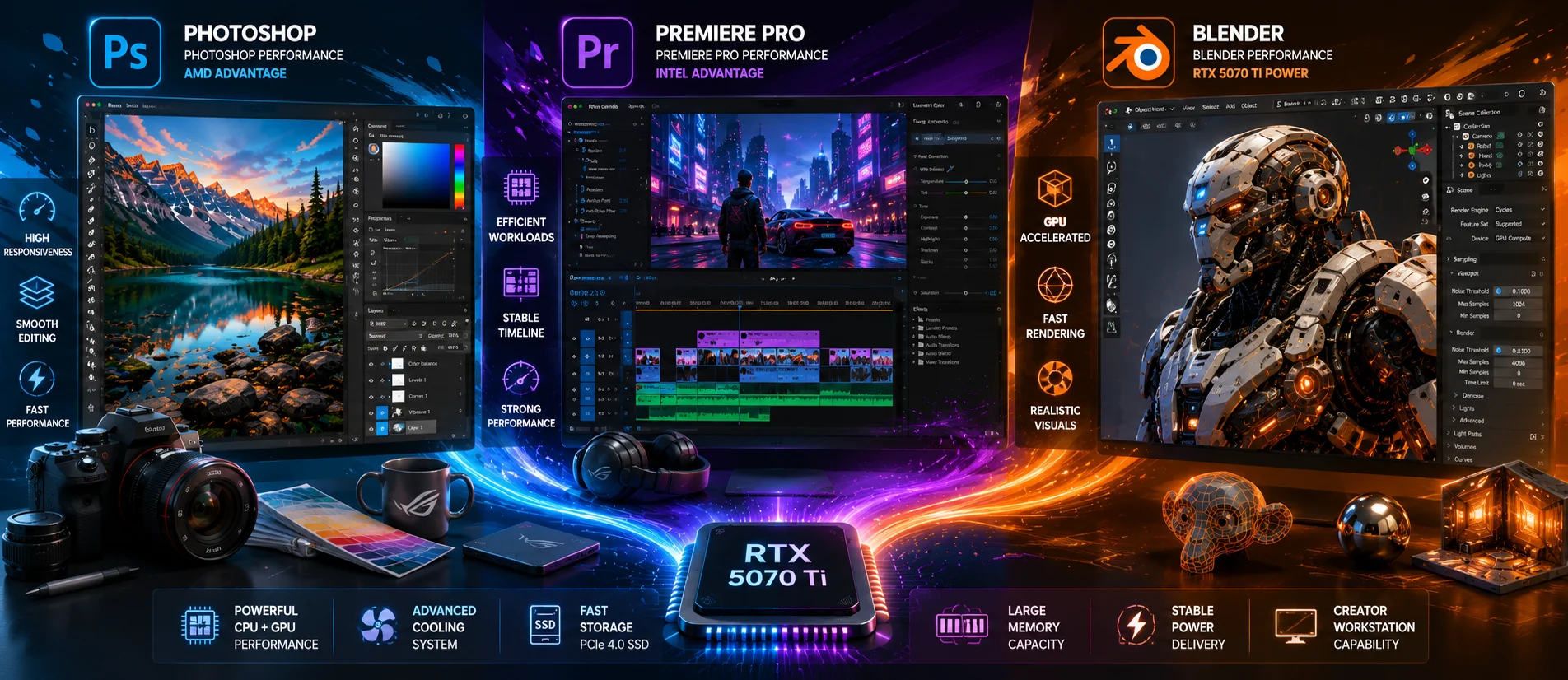
Creator Performance on the ASUS ROG Strix G16

Cartoon illustration comparing Photoshop, Premiere Pro and Blender creator workloads on ASUS ROG Strix G16 hardware with RTX 5070 Ti graphics
Even though the ASUS ROG Strix G16 is clearly designed as a gaming laptop first, the hardware inside makes it surprisingly capable as a desktop replacement laptop for creator and productivity workloads too.

This is not just a gaming machine.

With CPUs like:

  • the Intel Core Ultra 9 275HX,

  • and AMD Ryzen 9 9955HX3D,

combined with:

  • RTX 5070 Ti graphics,

  • high GPU wattage,

  • strong cooling,

  • and fast storage,

the Strix G16 can realistically function as:

  • a creator workstation,

  • programming machine,

  • editing system,

  • and productivity laptop.

Photoshop Actually Favored AMD

One of the more interesting benchmark results was Photoshop performance.

The AMD Ryzen 9 9955HX3D version actually performed better in Photoshop workloads compared to the Intel system.

That lines up with AMD’s aggressive high-performance approach and strong burst-heavy behavior.

Users focused heavily on:

  • Photoshop,

  • browser-heavy workflows,

  • and certain productivity tasks

may genuinely appreciate the AMD model’s responsiveness.

Premiere Pro Favored Intel

While AMD performed extremely well in Photoshop, Premiere Pro workloads leaned more in favor of Intel.

The Intel Core Ultra 9 275HX handled video editing workloads more efficiently overall.

That makes sense considering:

  • Intel’s hybrid architecture,

  • efficiency-core handling,

  • and stronger overall efficiency profile.

This is another example of why the Intel model feels balanced overall instead of being purely gaming-focused.

Blender Performance Was Nearly Identical

Blender workloads were extremely close between the two systems.

This reinforces one of the biggest themes of this review:

At this performance level, the RTX 5070 Ti often matters more than the CPU differences.

Both laptops delivered extremely strong GPU-heavy creator performance.

For:

  • 3D rendering,

  • GPU acceleration,

  • AI workloads,

  • and Blender rendering,

the Strix G16 performs like a genuinely high-end workstation-class gaming laptop.

Design Differences Between the Intel and AMD Models

At first glance, the Intel and AMD versions of the ASUS ROG Strix G16 look almost identical.

But once you start using them side-by-side, a surprising number of differences begin to appear.

These differences matter more than many buyers might expect because they directly affect:

  • usability,

  • upgradeability,

  • thermals,

  • portability,

  • and long-term ownership experience.

The Intel Model Feels Like the More Refined Chassis

The AMD version appears to use an older Strix chassis design, while the Intel model feels more like an updated revision.

Some of the biggest differences include:

  • larger touchpad on the Intel model,

  • updated rear hinge area,

  • easier internal access,

  • different RGB implementation,

  • and better port placement.

The Intel model also feels slightly cleaner visually.

Meanwhile, the AMD model leans harder into the aggressive gamer aesthetic with larger “STRIX” branding across the keyboard deck and more noticeable styling accents.

RGB Lighting Is More Advanced on the Intel Version

Close-up view of ASUS ROG Strix G16 RGB keyboard and chassis lighting illuminating a gaming desk

The RGB implementation is another interesting difference.

On the AMD version:

  • the RGB light bar mainly sits toward the front area of the laptop.

On the Intel version:

  • the RGB wraps around more of the chassis.

That creates:

  • stronger desk glow,

  • more visible ambient lighting,

  • and a more premium gaming aesthetic overall.

For some buyers this will not matter at all.

But for gaming enthusiasts building a full setup with:

  • RGB peripherals,

  • monitors,

  • and gaming accessories,

the Intel version definitely feels more visually premium.

IPS vs OLED: Is the Strix G16 Display Good Enough?

One of the biggest questions many buyers will ask is whether the ASUS ROG Strix G16 display is good enough compared to OLED gaming laptops like the ASUS ROG Zephyrus G16.

For gaming, the Strix G16 display still performs extremely well.

IPS vs OLED: What Actually Matters for Gaming?

The Strix G16 uses:

  • a 16-inch IPS-level panel,

  • 240Hz refresh rate,

  • 2560 × 1600 resolution,

  • and 3ms response times.

laptops like the ASUS ROG Zephyrus G16 use OLED panels.

OLED definitely delivers:

  • deeper blacks,

  • higher contrast,

  • and more cinematic visuals.

But IPS still has several advantages for gaming laptops:

  • strong brightness consistency,

  • no OLED burn-in concerns,

  • excellent motion handling,

  • and usually lower pricing.

Once games start running at high refresh rates on the Strix G16, the experience still feels genuinely premium.

The display is:

  • sharp,

  • smooth,

  • colorful,

  • and fast.

For most gamers, the GPU performance and thermal behavior of the Strix G16 will probably matter more than the IPS vs OLED debate.

What the ASUS ROG Strix G16 Is Like to Use Daily

Cartoon illustration showing the ASUS ROG Strix G16 used for studying, office work, programming, content creation and gaming throughout a typical day

One thing that became very clear during testing is that the ASUS ROG Strix G16 is surprisingly usable outside of gaming too.

A lot of gaming laptops feel awkward during normal everyday tasks because:

  • battery life is weak,

  • fans constantly ramp up,

  • or the chassis feels impractical.

The Intel version of the Strix G16 avoids many of those problems surprisingly well.

The Intel Version Feels a Lot More Flexible Day-to-Day

Because of the efficiency-core design and stronger battery behavior, the Intel version feels realistic for:

  • web browsing,

  • school work,

  • office tasks,

  • programming,

  • multitasking,

  • and creator workflows.

The nearly 9-hour battery result completely changes how portable the laptop feels compared to the AMD model.

This is still a large gaming laptop.

But the Intel system no longer feels trapped to a charger in the same way many older gaming laptops did.

While the Strix G16 is primarily a gaming machine, many of these workloads overlap with what users expect from modern business laptops, especially when connected to an external monitor setup.

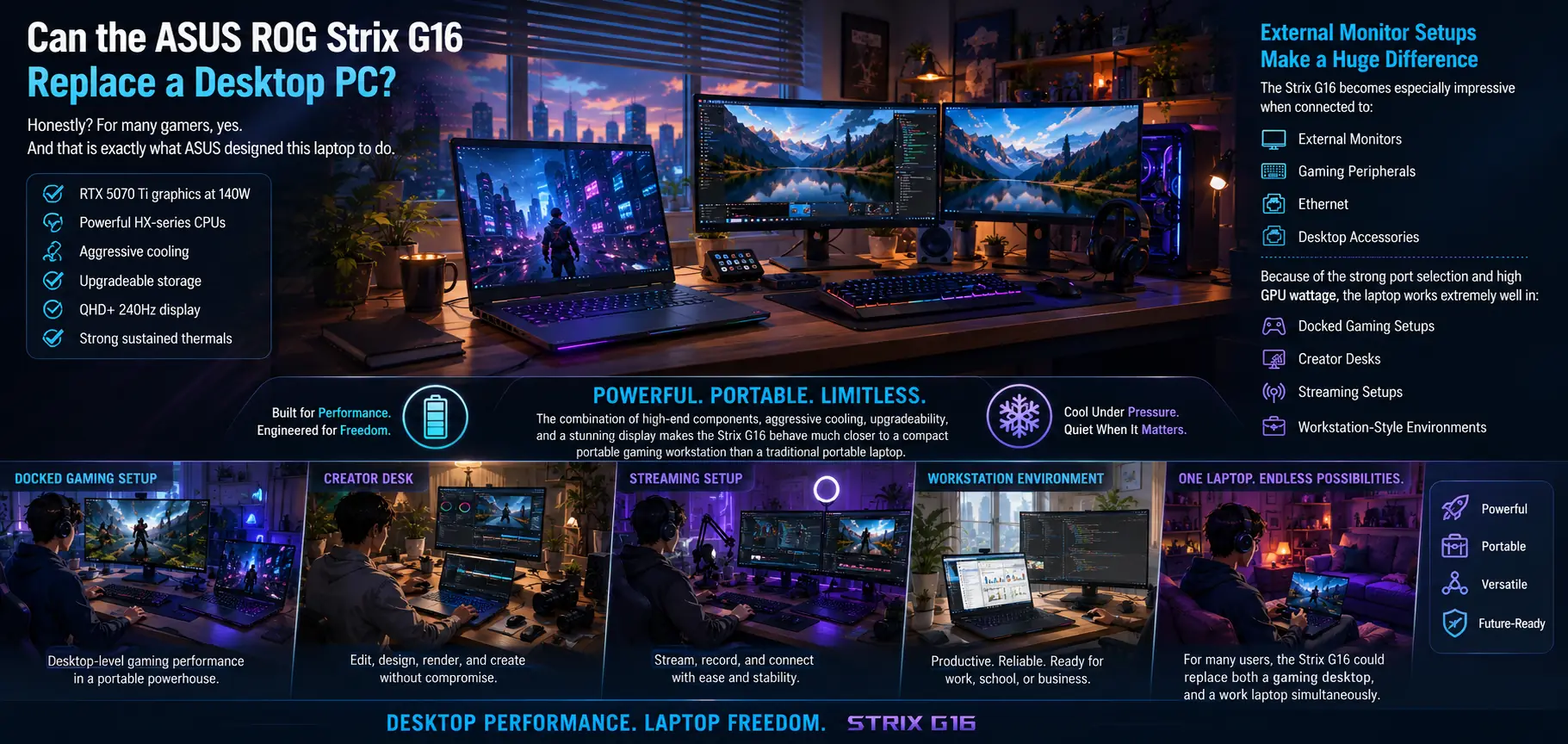
Can the ASUS ROG Strix G16 Replace a Desktop PC?

Ultrawide illustration showing the ASUS ROG Strix G16 replacing a gaming desktop through multi-monitor, creator, streaming and workstation setups

Honestly?

For many gamers, yes.

And that is exactly what ASUS designed this laptop to do.

The combination of:

  • RTX 5070 Ti graphics at 140W,

  • powerful HX-series CPUs,

  • aggressive cooling,

  • upgradeable storage,

  • QHD+ 240Hz display,

  • and strong sustained thermals

makes the Strix G16 behave much closer to a compact portable gaming workstation than a traditional portable laptop.

External Monitor Setups Make a Huge Difference

The Strix G16 becomes especially impressive when connected to:

  • external monitors,

  • gaming peripherals,

  • Ethernet,

  • and desktop accessories.

Because of the strong port selection and high GPU wattage, the laptop works extremely well in:

  • docked gaming setups,

  • creator desks,

  • streaming setups,

  • and workstation-style environments.

The Intel model especially benefits here because Thunderbolt 5 support adds much stronger long-term flexibility for:

  • docks,

  • ultra-fast storage,

  • and multi-monitor setups.

For many users, the Strix G16 could realistically replace:

  • both a gaming desktop,

  • and a work laptop simultaneously.

Which ASUS ROG Strix G16 Should You Actually Buy?

This is where things become very interesting because the answer is no longer as simple as:

“AMD is automatically better for gaming.”

After extensive testing, the Intel and AMD versions of the ASUS ROG Strix G16 ended up feeling like two different interpretations of the same laptop.

The AMD version feels more aggressive.

The Intel version feels more refined.

And depending on what type of user you are, that difference matters a lot.

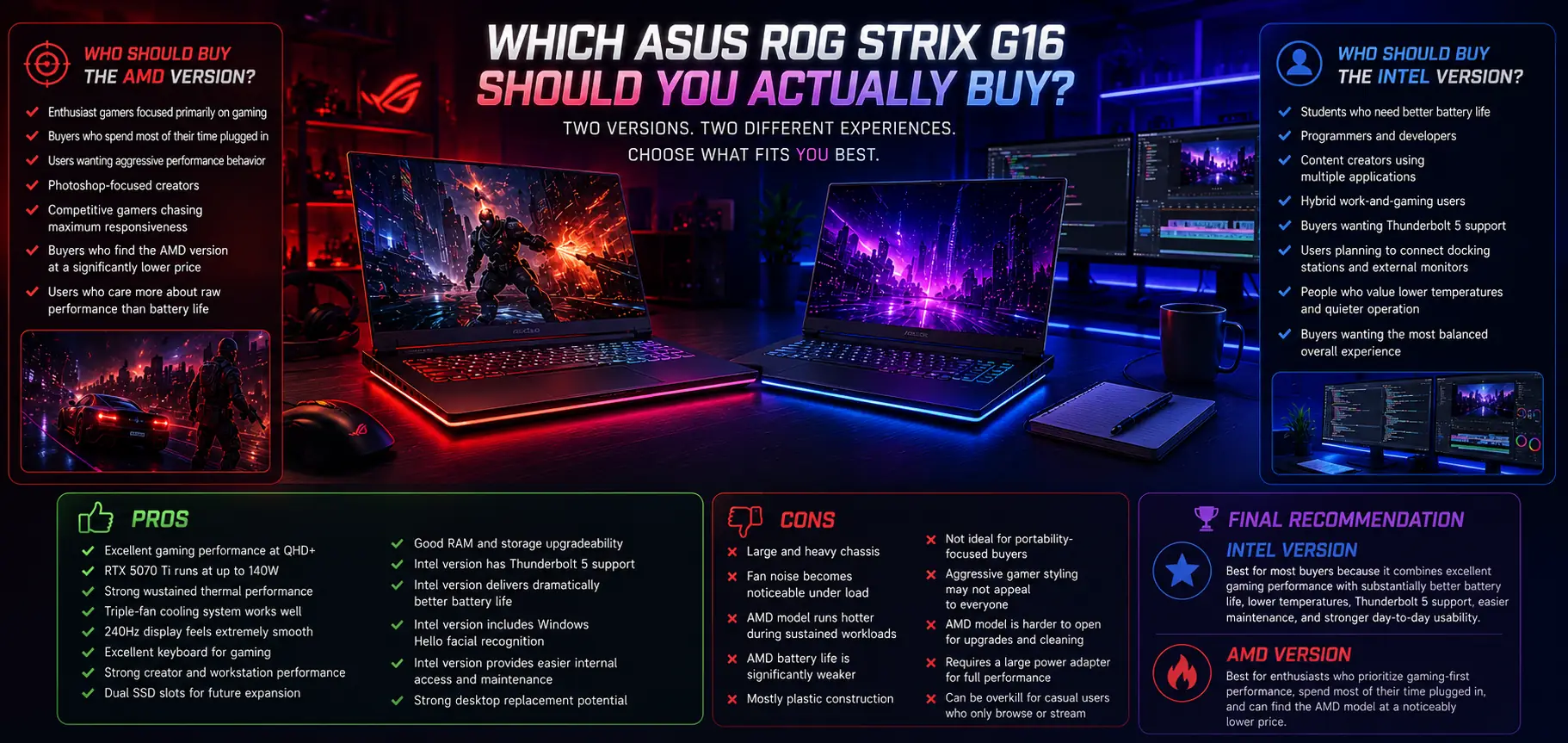
ASUS ROG Strix G16 AMD versus Intel buying guide with pros, cons, recommendations and gaming versus productivity comparison

Who Should Buy the Intel Model?

The Intel Core Ultra 9 275HX version is probably the smarter overall choice for most buyers.

Not necessarily because it completely destroys AMD in gaming performance.

But because the total package feels significantly more balanced.

The Intel model gives you:

  • much better battery life,

  • lower sustained temperatures,

  • Thunderbolt 5 support,

  • an extra USB-A port,

  • easier internal access,

  • Windows Hello facial recognition,

  • and more stable sustained thermal behavior.

Gaming performance also remained extremely competitive throughout testing.

For many users, the FPS difference simply was not large enough to justify sacrificing:

  • efficiency,

  • battery life,

  • and usability.

The Intel model makes the most sense for:

  • students,

  • creators,

  • programmers,

  • hybrid gaming/work users,

  • and buyers wanting the most complete overall experience.

Overall it feels realistic as a:

  • gaming laptop,

  • workstation,

  • and productivity machine combined.

Who Should Buy the AMD Model?

The AMD Ryzen 9 9955HX3D version still absolutely makes sense for certain buyers.

This laptop pushes very aggressive performance behavior and still performs exceptionally well in:

  • gaming,

  • Photoshop,

  • browser-heavy workloads,

  • and burst-heavy tasks.

The AMD model feels much more like:

  • a pure enthusiast gaming machine.

If your primary focus is:

  • maximum gaming-first behavior,

  • raw high-performance responsiveness,

  • and mostly plugged-in usage,

then the AMD system is still extremely compelling.

Especially if pricing becomes significantly cheaper than the Intel version later.

But at similar pricing?

The Intel version simply feels more complete overall.

ASUS ROG Strix G16 Pros and Cons

Pros

  • Excellent gaming performance at QHD+

  • RTX 5070 Ti runs at up to 140W

  • Strong sustained thermal performance

  • Triple-fan cooling system works well

  • 240Hz display feels extremely smooth

  • Excellent upgradeability

  • Dual SSD slots

  • Intel version has Thunderbolt 5

  • Intel version delivers dramatically better battery life

  • Strong creator and workstation performance

  • Great keyboard for gaming

  • High sustained performance under load

  • Easy internal access on Intel model

Cons

  • Large and heavy chassis
  • Fan noise becomes noticeable under load
  • AMD model runs hotter
  • AMD battery life is significantly weaker
  • Mostly plastic construction
  • Not ideal for portability-focused buyers
  • Aggressive gamer styling may not appeal to everyone
  • AMD model is harder to open for upgrades and maintenance

Final Verdict

The ASUS ROG Strix G16 succeeds because ASUS focused on the things serious gaming laptops actually need to do well:

  • sustain high performance,

  • cool powerful hardware properly,

  • allow the GPU to run at high wattage,

  • and maintain strong long-session gaming behavior.

That philosophy works extremely well here.

The high-wattage RTX 5070 Ti configuration delivers genuinely impressive gaming performance, the cooling system handles sustained workloads surprisingly well, and the laptop consistently behaves more like a compact desktop replacement than a typical portable gaming machine.

But the most interesting part of this entire review ended up being the Intel vs AMD comparison.

A few years ago, many enthusiasts would probably assume AMD completely dominates gaming laptops like this.

This time, Intel stayed surprisingly competitive while also delivering:

  • dramatically better battery life,

  • lower sustained temperatures,

  • easier upgradeability,

  • Thunderbolt 5,

  • and a more refined overall ownership experience.

That makes the Intel Core Ultra 9 275HX version the smarter overall recommendation for most buyers.

Meanwhile, the AMD Ryzen 9 9955HX3D version still makes a lot of sense for gamers who prioritize aggressive gaming-focused behavior above everything else.

Either way, the ASUS ROG Strix G16 easily earns its place as one of the strongest high-performance gaming laptops currently available.

👉 If you’d like to check current pricing or compare the Intel and AMD configurations, you can view the ASUS ROG Strix G16 on Amazon.

Frequently Asked Questions

FAQ section banner illustration with a person thinking about common laptop buying questions

Does the ASUS ROG Strix G16 overheat?

No — the great cooling system is where this laptop stands out.

The ASUS ROG Strix G16 uses a large triple-fan cooling system designed specifically for sustained gaming workloads. During testing, the Intel model generally stayed around:

  • 85–86°C under heavy load,

while the AMD version pushed closer to:

  • 90°C.

Those temperatures are fairly normal for high-performance gaming laptops running powerful HX-series processors and high-wattage RTX graphics.

More importantly, the laptop maintained:

  • stable clock speeds,
  • strong sustained gaming performance,
  • and very little thermal instability during longer sessions.

The fans do become noticeable under load, but the cooling system actually justifies the noise with genuinely strong thermal performance.

Can the ASUS ROG Strix G16 run games at 1440p or QHD?

Yes — extremely well.

The RTX 5070 Ti running at up to 140W gives the ASUS ROG Strix G16 enough GPU power to handle modern AAA games very comfortably at:

  • 2560 × 1600 resolution.

During testing, games like:

  • Cyberpunk 2077,
  • DOOM,
  • and Shadow of the Tomb Raider

all performed extremely well at QHD+ settings.

The high GPU wattage is especially important because many thinner gaming laptops run the same GPU at lower power limits, which reduces real-world gaming performance.

The Strix G16 allows the GPU to sustain much stronger long-session gaming behavior.

Is the ASUS ROG Strix G16 too heavy for travel?

That depends on what type of laptop you are expecting.

The ASUS ROG Strix G16 is not designed to be:

  • ultra-thin,
  • ultra-light,
  • or highly portable.

The laptop weighs roughly:

  • 5.5 to 5.8 pounds,

depending on configuration.

And once the large 280W charger is added, the total carrying weight increases noticeably.

However, that extra size exists for a reason.

The larger chassis allows ASUS to include:

  • stronger cooling,
  • higher GPU wattage,
  • and better sustained gaming performance.

For buyers wanting:

  • maximum portability,
  • quieter acoustics,
  • or thin-and-light gaming,

something like the ASUS ROG Zephyrus G16 may make more sense.

But for buyers prioritizing:

  • gaming performance,
  • thermals,
  • and desktop-replacement power,

the extra weight is usually worth the tradeoff.

Is the ASUS ROG Strix G16 good for video editing and content creation?

Yes — the ASUS ROG Strix G16 is surprisingly capable as a creator laptop.

The combination of:

  • HX-series processors,
  • RTX 5070 Ti graphics,
  • strong cooling,
  • high GPU wattage,
  • and fast storage

makes the laptop very strong for:

  • Premiere Pro,
  • Blender,
  • Photoshop,
  • rendering,
  • streaming,
  • and multitasking workflows.

Interestingly:

  • Photoshop performance favored AMD,
  • while Premiere Pro leaned more toward Intel.

Blender performance between the two systems was extremely close because GPU performance mattered more heavily there.

For creators wanting a laptop that can handle:

  • gaming,
  • editing,
  • rendering,
  • and workstation-style usage,

the Strix G16 performs extremely well overall.

Is the Intel or AMD ASUS ROG Strix G16 better?

For most buyers, the Intel version is probably the better overall choice.

Not because it completely destroys AMD in gaming performance.

But because it delivers a more balanced overall experience.

The Intel Core Ultra 9 275HX version offers:

  • dramatically better battery life,
  • lower sustained temperatures,
  • Thunderbolt 5 support,
  • easier upgrade access,
  • Windows Hello facial recognition,
  • and more refined usability overall.

Meanwhile, the AMD Ryzen 9 9955HX3D version still performs extremely well for:

  • gaming,
  • Photoshop,
  • and raw high-performance workloads.

If pricing between the two systems is very close, the Intel version is probably the smarter recommendation for most users.

Is the ASUS ROG Strix G16 good for competitive gaming?

Yes — the ASUS ROG Strix G16 is excellent for competitive gaming.

The combination of:

  • a 240Hz display,

  • 3ms response time,

  • powerful HX-series CPUs,

  • and high-wattage RTX graphics

makes the laptop extremely strong for:

  • esports titles,

  • fast-paced shooters,

  • multiplayer gaming,

  • and high-refresh-rate gameplay.

Games feel:

  • smooth,

  • responsive,

  • and very fluid during movement.

The strong cooling system also helps maintain stable performance during longer gaming sessions, which is important for competitive players who game for hours at a time.

Is the ASUS ROG Strix G16 worth buying over thinner gaming laptops?

For buyers prioritizing:

  • gaming performance,

  • cooling,

  • upgradeability,

  • and long-session stability,

yes — absolutely.

Thinner gaming laptops often sacrifice:

  • GPU wattage,

  • thermal headroom,

  • upgradeability,

  • or sustained performance

to achieve slimmer designs.

The ASUS ROG Strix G16 takes the opposite approach.

ASUS prioritized:

  • stronger cooling,

  • higher GPU power limits,

  • better sustained performance,

  • and desktop-replacement behavior.

The tradeoff is:

  • more weight,

  • larger size,

  • and louder fans under load.

But for serious gamers, the performance benefits are often worth it.

Is the ASUS ROG Strix G16 good for college students?

For the average college student?

Honestly, probably not.

The ASUS ROG Strix G16 is an extremely powerful high-performance gaming laptop designed more like a desktop replacement than a typical student laptop.

Most students simply do not need:

  • HX-series processors,

  • RTX 5070 Ti graphics,

  • 140W GPU power,

  • aggressive cooling systems,

  • or a large heavy chassis like this.

The Strix G16 makes far more sense for students involved in:

  • 3D rendering,

  • game development,

  • engineering,

  • AI workloads,

  • video production,

  • advanced creative work,

  • or other hardware-intensive fields.

For normal everyday college usage like:

  • note taking,

  • browsing,

  • office work,

  • online classes,

  • and general productivity,

this laptop is honestly overkill.

It is also:

  • large,

  • heavy,

  • and expensive compared to what most students realistically need.

Average students would usually be much better off looking into: budget laptops, business laptops, or travel-focused ultrabooks.

because buying a machine this powerful for basic student workloads would honestly be a waste of money for something they simply do not need.

However, if you are:

  • a serious gamer,

  • a power user,

  • or a student who genuinely wants elite gaming performance and can comfortably afford it without stretching your budget,

then honestly:

  • knock yourself out.

The ASUS ROG Strix G16 is an excellent high-performance gaming machine.

Does the ASUS ROG Strix G16 have good build quality?

Yes — especially for a high-performance gaming laptop.

Most of the chassis uses plastic construction, but the lid itself is metal, helping the laptop feel more premium than cheaper gaming systems.

More importantly, the laptop feels structurally designed around:

  • cooling,

  • airflow,

  • and sustained performance.

The hinge mechanism also felt solid during testing, and the keyboard remained stable even during heavier gaming sessions.

This is not a luxury ultrabook-style build focused on thinness.

Instead, ASUS clearly prioritized:

  • durability,

  • cooling capacity,

  • and performance-focused engineering.

Is the RTX 5070 Ti enough for modern AAA gaming?

Yes — especially at QHD+ resolution.

The RTX 5070 Ti inside the ASUS ROG Strix G16 performs extremely well because ASUS allows the GPU to run at up to:

  • 140W.

That higher GPU wattage helps maintain:

  • stronger boost behavior,

  • higher sustained FPS,

  • and better long-session gaming performance.

Modern AAA games like:

  • Cyberpunk 2077,

  • DOOM,

  • and Shadow of the Tomb Raider

all performed extremely well during testing at:

  • 2560 × 1600 resolution.

For most gamers, the RTX 5070 Ti is more than powerful enough for:

  • high settings,

  • high refresh rate gaming,

  • ray tracing,

  • and modern AAA titles.

Is the ASUS ROG Strix G16 good for long gaming sessions?

Yes — that is exactly what it was made for.

The large triple-fan cooling system allows the Strix G16 to maintain:

  • stable thermals,

  • strong sustained clock speeds,

  • and high GPU performance

even during extended gaming sessions.

This is extremely important because many thinner gaming laptops perform well initially before temperatures rise and performance starts dropping.

The Strix G16 behaves more like a true high-performance gaming machine.

The fans do become noticeable under load, but the cooling system actually uses that airflow effectively to sustain high performance over time.

Leave a Comment

Your email address will not be published. Required fields are marked *

Specification ROG Strix G16 (AMD)
CPU AMD Ryzen 9 9955HX3D
GPU NVIDIA GeForce RTX 5070 Ti Laptop GPU
GPU Power Limit Up to 140W
Display 16-inch QHD+ (2560 × 1600)
Refresh Rate 240Hz
Aspect Ratio 16:10
Response Time 3ms
Memory Upgradeable DDR5 Memory
Storage NVMe SSD with Dual SSD Slots
Battery 90Wh
Ports USB4, HDMI 2.1, RJ45 Ethernet, USB-A, Combo Audio Jack
Biometrics None
Cooling Triple-Fan Cooling System
Best For Gaming, Esports, Competitive Shooters, Streaming, Content Creation, and CPU-Heavy Workloads